

Tic-Toc is a demonstration of the Theory of Constraints based on a game created by Eliyahu Goldratt in the book “The Goal”. It will demonstrate the impact of variability and dependency on a simple system. By using simple everyday items like dice, post-it notes, and columns to represent workstations, the game will allow users to explore different ways of improving or impeding work flowing through a system.
Play the Game

How to play
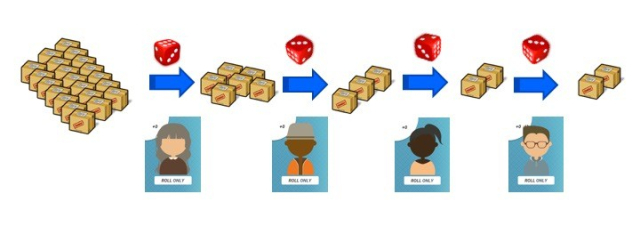
Description of mechanics
Game controls:

Roll will roll a 6-sided dice for the current workstation in the sequence. The resulting value represents the amount of work completed for that workstation.
Run Cycle will automatically roll dice and move cards for all workstations until each workstation’s work has been completed once. Each cycle is part of a simulation.
Run Simulation will complete all steps and cycles a set number of times. Preconfigured to be 10 cycles per simulation.

Reset will return the game to starting point for configured simulation
Navigation

3-D Box Image – Game view page : Interactive simulation using a Kanban board to reflect the progress of the game.
Area Chart Image – Graph view page : View the state and progress of the simulation in the form of a Cumulative Flow Diagram, the diagram updates as the simulation progresses
Waffle Image – Table view page : In depth detail of all the data on the simulation in table format.
Bulleted-List Image – Model view page : Run a simulation hundreds of times to eliminate variability and compare configurations to understand the impact of various settings.
Gear – Configuration page. This is only available when game is reset : Enables user to configure the game or to restore default values.
Help – Link to more in-depth information on the application.
Game View

Backlog is an unlimited supply of work items that are moved through the workstations and eventually Completed and Delivered.
WS workstations are columns that represent work being performed (activity) as represented by a dice roll and completed (done) as represented by post-it notecards. Work flows sequentially from WS 1 through the last WS. The game can be configured for three to 10 workstations.
Delivered holds all cards that have stepped through each workstation. Preconfigured for 4 workstations.
Completed holds cards for the last workstation for a set cadence to the delivered column. Cards will only accumulate in the Completed section if Cadence is configured to be different from “Daily” in Configuration View.
Configuration Panel

Configuration will allow game settings to be configured so the user can explore the effects that various changes have on work throughput.
Default Config will reset all settings to the game default settings
Number of workstations drop down that allows selection of 3 to 10 workstations.
Number of cycles drop down for setting the number of cycles per simulation from 1 week up to 10 years.
Delivery cadence allows for modification to the number of cycles that are completed before all post-it cards are delivered. The choices of cadence are related to the number of cycles selected.
Simulations to run is only for Model View. This allows for comparisons of different configurations over different “time periods”.
Show Effort is only for Table View. Effort will appear parenthetically for each workstation if toggled ON. Effort will not appear in the Table View if toggled OFF.
System WIP limits allows setting a single WIP limit for all workstations.
Modifier is an adjustment made to the raw dice roll on a per workstation basis. The allowed range is -2 to +5. The modifier is independent of any WIP limit settings.
WIP Limit is an adjustment made that restricts the number of post-it cards (work items) that can be processed on a per workstation basis. The allowed range is 0 (no limit) to 20.
System WIP Limit is an adjustment applied to the whole system. The allowed range is 0 (no limit) to 10 * number of workstations.
Graph View

A cumulative flow diagram (CFD) of the current simulation.
The CFD shows the values of work done and delivered across cycles.
All game controls are active in this view.
Table View

A table representation of the current simulation.
All data generated and used for the current simulation.
The table representation allows for examination of the historical data of the simulation.
All game controls are active in this view.
Model View

A table that allows for large number of simulations to be examined and compared.
The configuration is executed the specified number of times, as defined in the Configuration panel.
Run Models will execute the defined simulations and post the data. Any modifications made are reflected in the table (# of workstations, modifiers, WIP limits, etc.).
Reset will clear all data.
Configuration Panel is available between model executions.
Model view is independent of the other views.
Get new content delivered directly to your inbox.
 TicToC